




ポイント: このチュートリアルは、MongoDBの公式PythonドライバーであるPyMongoの使用に関する包括的なガイドを提供し、インストール、接続、および基本的なCRUD操作をカバーします。
pip経由でPyMongoをインストールし、MongoDBに接続します。
コレクションとドキュメントに対してCRUD操作を実行します。
追加のリソースにアクセスして、さらなる学習を行います。ドキュメントを含む。
このチュートリアルでは、MongoDBでPyMongoを使用する方法を説明します。
PyMongoとは
PyMongoは、MongoDBデータベースに接続し、対話するための公式のPythonドライバーです。PyMongoライブラリはMongoDBチームによって活発に開発されています。
PyMongoのインストール
PyMongoは、任意のプラットフォームでpip を介して簡単にインストールできます。
PyMongoの使用方法
pip install pymongo
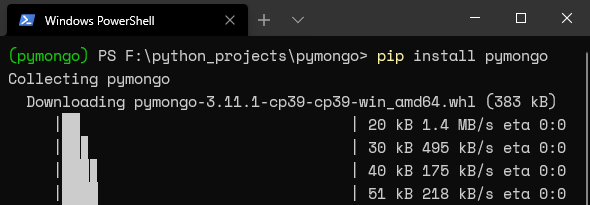
pipを介してPyMongoのインストールを確認するか、モジュールをPythonファイルにインポートしてみてください。
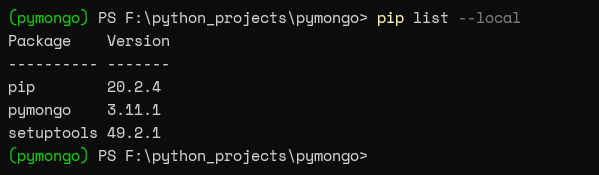
pipを介して確認する:
pip list --local
PyMongoモジュールをインポートするシンプルなPythonファイルを作成しましょう。インポート文はtry-except文でラップされており、インポート文の成功または失敗に基づいて出力メッセージが表示されます。
    try:
import pymongo
print("Module Import Successful")
except ImportError as error:
print("Module Import Error")
print(error)

このセクションでは、PyMongoモジュールの基本的な使用法と、それを使用してMongoDBインストールと対話する方法を説明します。この記事で使用されているMongoDBサーバーの詳細は以下の通りです:
- IP:10.10.10.59
- ポート:27017
/etc/mongod.conf
    # network interfaces
net:
port: 27017
bindIp: 127.0.0.1, 10.10.10.59
データベースへのアクセスを許可するには、サーバーの外部IPをbindIpパラメータに追加する必要があります。それは「mongod.conf」ファイルのネットワークセクションにあります。
ここでは、私が行う方法を示します:
- MongoDBインストールに接続
- データベースからコレクションを取得
- コレクション内のドキュメントを見つける
- 1つのドキュメントを見つける
- データベース、コレクション、およびドキュメントを作成
- コレクションにドキュメントを挿入
- ドキュメントを更新
- ドキュメント、コレクション、およびデータベースを削除
MongoDBインストールへの接続
接続文字列を定義する方法は2つあります:
- IPとポートを使用
- MongoURLを使用
結果:
    from pymongo import MongoClient
client = MongoClient('10.10.10.59', 27017)
# Alternative Connection Method - MongoURL Format
# client = MongoClient('mongodb://10.10.10.59:27017')
print(client.server_info())
結果:

この例では、MongoDBサーバーのIPとポートを指定してMongoClientクラスの新しいインスタンスを作成することで接続を確立しました。次に、server_info()関数を呼び出してMongoDBサーバーインスタンスに関するデータを取得します。
次の例では、list_database_names()関数を呼び出してすべてのデータベースのリストを取得します。
結果:
    from pymongo import MongoClient
client = MongoClient('10.10.10.59', 27017)
print(client.list_database_names())
結果:

データベースからコレクションを取得
list_collection_namesメソッドを使用して、指定されたデータベースオブジェクトからコレクションのリストを取得できます。include_system_collectionは、システムによって作成されたコレクションを除外するためにFalseに設定されます。
結果:
    from pymongo import MongoClient
# Create Connection
client = MongoClient('10.10.10.59', 27017)
# Select the Database
database = client.students
# Alternative Declaration Method
# database = client['students']
# Get List of Collections
collection = database.list_collection_names(include_system_collections=False)
print(collection)
結果:

コレクション内のドキュメントを見つける
find()メソッドを使用して、コレクション内の任意のドキュメントを検索できます。理解を深めるために例を見てみましょう。
結果:
find()メソッド
結果:
    from pymongo import MongoClient
# Create Connection
client = MongoClient('10.10.10.59', 27017)
# Select the Database
database = client.students
# Get Details of the specified Collection
collection = database['student_grades']
# Print each Document
for studentinfo in collection.find():
print(studentinfo)
結果:

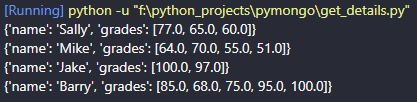
他のMongoDBオペレーター、例えばプロジェクション、プッシュとプル、およびソートをfind()メソッド内で使用して出力をフィルタリングできます。
次の例では、MongoDBプロジェクションオペレーターを使用して「_id」フィールドをフィルタリングし、結果のデータセットを降順にソートします。
結果:
    from pymongo import MongoClient

# Create Connection
client = MongoClient('10.10.10.59', 27017)
# Select the Database
database = client.students
# Get Details of the specified Collection
collection = database['student_grades']
# Print each Document
for studentinfo in collection.find({},{'_id':0}).sort('name',-1):
print(studentinfo)
結果:
コレクションから1つのドキュメントを見つける
PyMongoは、コレクションから1つのドキュメントを見つけるためのfind_one()およびfind()メソッドを提供します:
- find_one()メソッドは、指定された条件に基づいて最初のドキュメントを返します。
- find()メソッドは、データを変換するための追加のヘルパーメソッドを含む反復可能なオブジェクトであるカーソルオブジェクトを返します。
find_one()メソッド
結果:
find_one()メソッド
    from pymongo import MongoClient
# Create Connection
client = MongoClient('10.10.10.59', 27017)
# Select the Database
database = client.students
# Get Details of the specified Collection
collection = database['student_grades']
studentinfo = collection.find_one({'name':'Mike'})
print(studentinfo)
結果:

find()メソッド
    from pymongo import MongoClient
# Create Connection
client = MongoClient('10.10.10.59', 27017)
# Select the Database
database = client.students
# Get Details of the specified Collection
collection = database['student_grades']
studentinfo = collection.find({'name':'Mike'})
print(studentinfo)
結果:

可読性のある出力を得るために、オブジェクトを反復するループを使用できます。
結果:
    from pymongo import MongoClient

# Create Connection
client = MongoClient('10.10.10.59', 27017)
# Select the Database
database = client.students
# Get Details of the specified Collection
collection = database['student_grades']
studentinfo = collection.find({'name':'Mike'})
# print(studentinfo)
# Print each Document
for student in studentinfo:
print(student)
結果:

データベース、コレクション、およびドキュメントの作成
このセクションでは、データベースとコレクションの作成方法、および新しいコレクションにドキュメントを挿入する方法を見ていきます。MongoDBは、データベースに少なくとも1つのドキュメントがあるまでデータベースを作成しません。
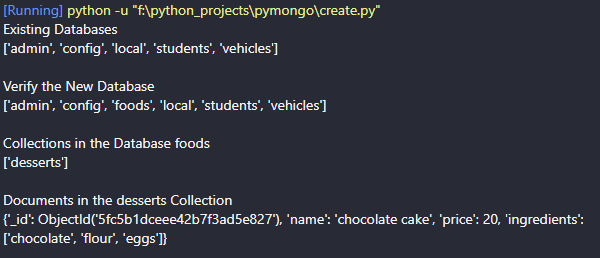
以下の例は、insert_one()メソッドを使用して、「food」というデータベースと「dessert」というコレクションを持つ単一のドキュメントを作成する方法を示しています。PyMongoは、選択したデータベースが利用できない場合、新しいデータベースを自動的に作成します。
結果:
    from pymongo import MongoClient
# Create Connection
client = MongoClient('10.10.10.59', 27017)
print(f"Existing Databases")
print(client.list_database_names())
# Create a New Database - dictionary style
database_foods = client['foods']
# Alternative method for simple strings #
# database = client.foods
# Create a Collection - dictionary style
col_desserts = database_foods['desserts']
# Insert a Single Document
document = {'name': 'chocolate cake', 'price': 20, 'ingredients':['chocolate', 'flour', 'eggs']}
col_desserts.insert_one(document)
print(f"\nVerify the New Database")
print(client.list_database_names())
print(f"\nCollections in the Database foods")
print(database_foods.list_collection_names())
print(f"\nDocuments in the desserts Collection")
dessert = col_desserts.find()
# Print each Document
for des in dessert:
print(des)
結果:
コレクションにドキュメントを挿入する
PyMongoはドキュメントを挿入するための2つのメソッドを提供します:insert_one()とinsert_many():
- Insert_one()は1つのドキュメントを挿入するために使用されます
- Insert_many()は複数のドキュメントを挿入します。
「desserts」コレクションの例をいくつか見てみましょう。
単一のドキュメントを挿入する
結果:
    from pymongo import MongoClient
# Create Connection
client = MongoClient('10.10.10.59', 27017)
database_foods = client['foods']
col_desserts = database_foods['desserts']
print(f"\nAll Documents in the desserts Collection")
dessert = col_desserts.find()
# Print each Document
for des in dessert:
print(des)
# Insert a Single Document
document = {'name': 'ice cream', 'price': 10, 'ingredients':['milk', 'vanilla extract', 'eggs', 'heavy cream', 'sugar']}
col_desserts.insert_one(document)
print(f"\nAfter Insert")
dessert = col_desserts.find()
# Print each Document
for des in dessert:
print(des)
結果:

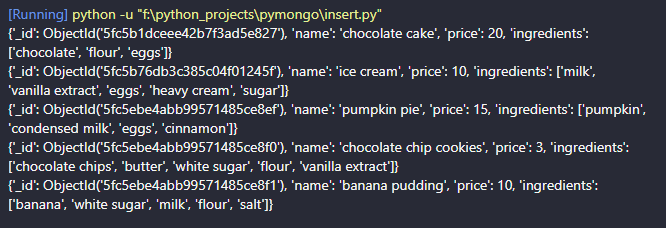
複数のドキュメントを挿入する
結果:
    from pymongo import MongoClient
# Create Connection
client = MongoClient('10.10.10.59', 27017)
database_foods = client['foods']
col_desserts = database_foods['desserts']
documents = [
{'name': 'pumpkin pie', 'price': 15, 'ingredients':['pumpkin', 'condensed milk', 'eggs', 'cinnamon']},
{'name': 'chocolate chip cookies', 'price': 3, 'ingredients':['chocolate chips', 'butter', 'white sugar', 'flour', 'vanilla extract']},
{'name': 'banana pudding', 'price': 10, 'ingredients':['banana', 'white sugar', 'milk', 'flour', 'salt']}
]
col_desserts.insert_many(documents)
dessert = col_desserts.find({},{'_id':0})
# Print each Document
for des in dessert:
print(des)
結果:
ドキュメントの更新
メソッドupdate_one()とupdate_many()は、単一のドキュメントまたは複数のドキュメントを更新するために使用されます。以下の例は、これらのメソッドがどのように使用されるかを示しています。
単一のドキュメントを更新する
この例では、「_id」フィールドで指定されたドキュメントの「price」フィールドを更新します。これを行うには、「bson」モジュールからObjectIdクラスをインポートする必要があります。
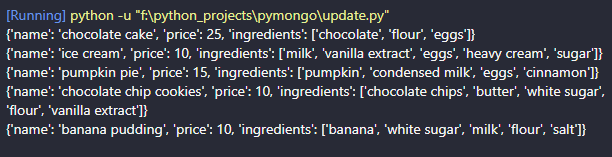
この例では、チョコレートクッキーの価格を5に更新しました。
結果:
    from pymongo import MongoClient
from bson.objectid import ObjectId
# Create Connection
client = MongoClient('10.10.10.59', 27017)
database_foods = client['foods']
col_desserts = database_foods['desserts']
document = {'_id': ObjectId('5fc5ebe4abb99571485ce8f0')}
updated_values = {'$set': {'price': 5}}
# Update the Document
col_desserts.update_one(document, updated_values)
# Find the Updated Document
updated_doc = col_desserts.find_one({'_id': ObjectId('5fc5ebe4abb99571485ce8f0')})
print(updated_doc)
結果:

複数のドキュメントを更新する
この例では、$regexオペレーターを使用して「name」が「chocolate」で始まるすべてのドキュメントを見つけます。その後、$incオペレーターを使用して価格を5増加させます。
結果:
    from pymongo import MongoClient
# Create Connection
client = MongoClient('10.10.10.59', 27017)
database_foods = client['foods']
col_desserts = database_foods['desserts']
# Find Documents that starts with chocolate
document = {"name": { "$regex": "^chocolate"}}
# Increase the existing value by five
updated_values = {'$inc': {'price': 5}}
# Update the Documents
col_desserts.update_many(document, updated_values)
# Find the Updated Documents
for des in col_desserts.find({},{'_id':0}):
print(des)
結果:
ドキュメント、コレクション、およびデータベースを削除する
PyMongo内で「削除」がどのように機能するかを見てみましょう:
- delete_one()メソッドは単一のドキュメントを削除します。
- delete_many()メソッドは複数のファイルを削除します。
- drop()メソッドはコレクションを削除します。
- drop_database()メソッドはデータベースを削除します。
各使用例のための例を見てみましょう。
単一のドキュメントを削除する
「_id」フィールドを識別子として使用してドキュメントを削除します。
結果:
    from pymongo import MongoClient
from bson.objectid import ObjectId
# Create Connection
client = MongoClient('10.10.10.59', 27017)
database_foods = client['foods']
col_desserts = database_foods['desserts']
document = {'_id': ObjectId('5fc5ebe4abb99571485ce8f0')}
# Delete the Document
col_desserts.delete_one(document)
# Find the Remaining Documents
for des in col_desserts.find():
print(des)
結果:

複数のドキュメントを削除する
価格が10以下のすべてのドキュメントを「desserts」コレクションから削除します。
結果:
    from pymongo import MongoClient
# Create Connection
client = MongoClient('10.10.10.59', 27017)
database_foods = client['foods']
col_desserts = database_foods['desserts']
# Select only documents where price is less than or equal to 10
document = {'price': { '$lte': 10 }}
# Delete the Document
col_desserts.delete_many(document)
# Find the Remaining Documents
for des in col_desserts.find():
print(des)
結果:

コレクションを削除する
MongoDBコレクションはdrop()メソッドを使用して削除できます。以下は、「food」データベースから「desserts」コレクション全体を削除する方法です。
結果:
    from pymongo import MongoClient
# Create Connection
client = MongoClient('10.10.10.59', 27017)
database_foods = client['foods']
# Check currently available collections
print(database_foods.list_collection_names())
# Delete the collection
col_desserts = database_foods['desserts']
col_desserts.drop()
# Print the remaining collections
print(database_foods.list_collection_names())
結果:

2番目のprint文は、私たちが「foods」データベースから唯一のコレクションを削除したため、空です。
データベースを削除する
以下の例は、すべてのコレクションとドキュメントを持つ完全なデータベースを削除する方法を示しています。「students」をdrop_database()メソッドを使用して削除します。
結果:
    from pymongo import MongoClient
# Create Connection
client = MongoClient('10.10.10.59', 27017)
# List all databases
print(client.list_database_names())
# Check for Data within the database
database_students = client['students']
print('')
print(database_students.list_collection_names())
# Delete the complete database
client.drop_database('students')
# Verify the Deletion
print('')
print(client.list_database_names())
結果:
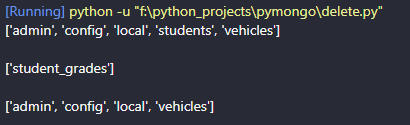
ご覧のように、「students」データベースは完全に削除されました。
これでこのチュートリアルは終了です。PyMongoについてさらに学びたい場合は、最良の情報源は彼らのドキュメントです。
関連する読み物
MongoDBガイド
- MongoDB概要:MongoDBの始め方
- UbuntuとMacにMongoDBをインストールする方法
- MongoDBでデータベースを作成する
- MongoDBシェル基本コマンド
- MongoDB Compass:Mongo GUIの使用
- MongoDBの役割ベースのアクセス制御(RBAC)について
- MongoDBプロジェクションとプロジェクションオペレーターの説明
- MongoDB集約関数の説明
- MongoDBのソート:sort()メソッドと例
- MongoDBでのプッシュおよびプルオペレーターの使用
- MongoDBの$unwindの使用方法
- 23の一般的なMongoDBクエリオペレーターとその使用方法
- MongoDBのGeoLocationクエリ例
- MongoDBトランザクションの紹介
- MongoDBインデックス:主要なインデックスタイプとその管理方法
- 知っておくべきMongoDBの主要コマンド
- MongoDBのレプリケーション:完全な紹介
- MongoDBクラスタの設定方法
- MongoDBシャーディング:概念、例、チュートリアル
- MongoDB Atlas:管理されたMongoDBの設定と使用
- MongoDBをDockerコンテナとして実行する方法
- MongoDBのメモリ使用量、管理、および要件
- MongoDBバックアップのためのmongodumpの使用方法
- MongoDBバックアップを復元するためのmongorestoreの例
- PyMongoの使用方法
- MongoDBとNodeJSのためのMongooseの使用方法
- MongoDBチートシート
- MongoDBとCassandra:NoSQLデータベースの比較
- PostgreSQLとMongoDB:データベースの比較
- MySQLとMongoDB:データベースの比較
- MongoDB認定:紹介
これらの投稿は私自身のものであり、必ずしもBMCの立場、戦略、意見を表すものではありません。